Zero to Hero – Getting Started with Microsoft Defender for Endpoint – Basics, Licensing and Features
Introduction
In the first article of our Zero to Hero series, we explored what Microsoft Defender XDR is and why this series exists. We looked at the bigger picture: How XDR unifies signals across identities, endpoints, email, and cloud apps defend attacker’s.
Now it’s time to zoom in on one of the most critical parts of XDR: Microsoft Defender for Endpoint (MDE). Why start here? Because endpoints remain a critical point for attackers and defenders. Compromised devices often serve as the start for lateral movement, privilege escalation, and persistence.
This article will cover the fundamentals of MDE:
What it is and how it fits into the XDR ecosystem
Licensing options and what you need to know
Core components and capabilities that differ MDE from traditional AV solutions
Kill Chain
Before we dive into MDE itself, let’s take a look at a theoretical concept in cybersecurity that, in my opinion, perfectly demonstrates how a typical cyberattack unfolds and how different security solutions fit into the defense strategy: the Cybersecurity Kill Chain.
The Kill Chain, originally introduced by Lockheed Martin, breaks an attack down into stages:
Reconnaissance – Gathering information about the target
Weaponization – Preparing malicious payloads
Delivery – Sending the payload (e.g., phishing email)
Exploitation – Exploiting a vulnerability
Installation – Deploying malware or persistence mechanisms
Command & Control (C2) – Establishing remote control
Actions on Objectives – Data exfiltration, lateral movement, impact
Where does Defender for Endpoint fit?
MDE primarily operates in the Exploitation, Installation and C2 phases. It detects and blocks malicious files, scripts, and behaviors before they can establish persistence. With Features (we will take a look into that in a moment) Attack Surface Reduction (ASR) and Next-Generation Protection, MDE reduces the chance of exploitation. If an attacker bypasses initial defenses, Endpoint Detection & Response (EDR) kicks in to detect suspicious activity and enable remediation.
Defender for Endpoint
Before we get into licensing and features, let’s answer the fundamental question: What is Microsoft Defender for Endpoint (MDE)?
MDE is Microsoft’s enterprise-grade endpoint security platform. It goes far beyond traditional antivirus by combining prevention, detection, and response capabilities into a single solution. Think of it as the endpoint pillar within the broader Defender XDR ecosystem. While XDR correlates signals across identities, email, and cloud apps, MDE focuses on securing the device layer.
MDE is: Cloud-native, deeply integrated into M365, supports all common plattforms (Windows, macOS, Linus, iOS and Android) and offers broad capabilities to integrate automation with APIs.
Licensing
Licensing for MDE can be confusing at first glance, so let’s break it down. There are three main plans for endpoints and additional options for servers operating systems:
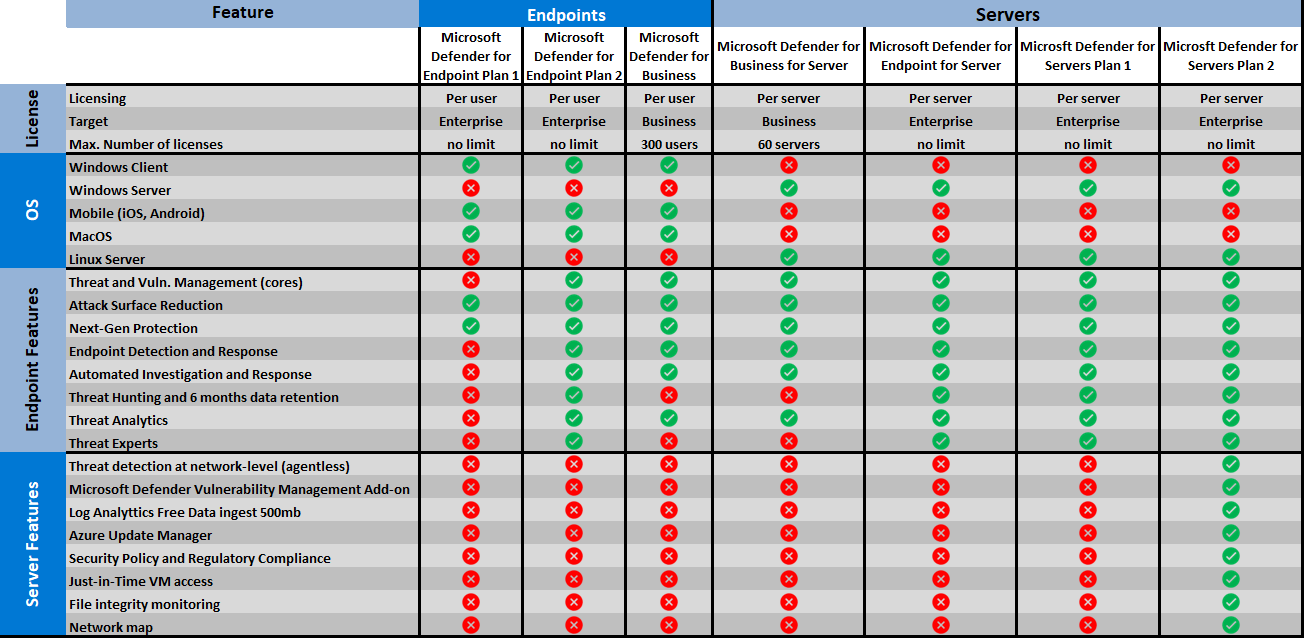
Additional Add-Ons: Defender Vulnerability Management add-on for enhanced capabilities including Harware&Firmware assessments, block vulnerable apps, Browser extensions, certificate …
Overview Components
Microsoft Defender for Endpoint is a collection of integrated capabilities designed to protect the entire endpoint lifecycle. Let’s break down the core components that make MDE a comprehensive endpoint security solution.
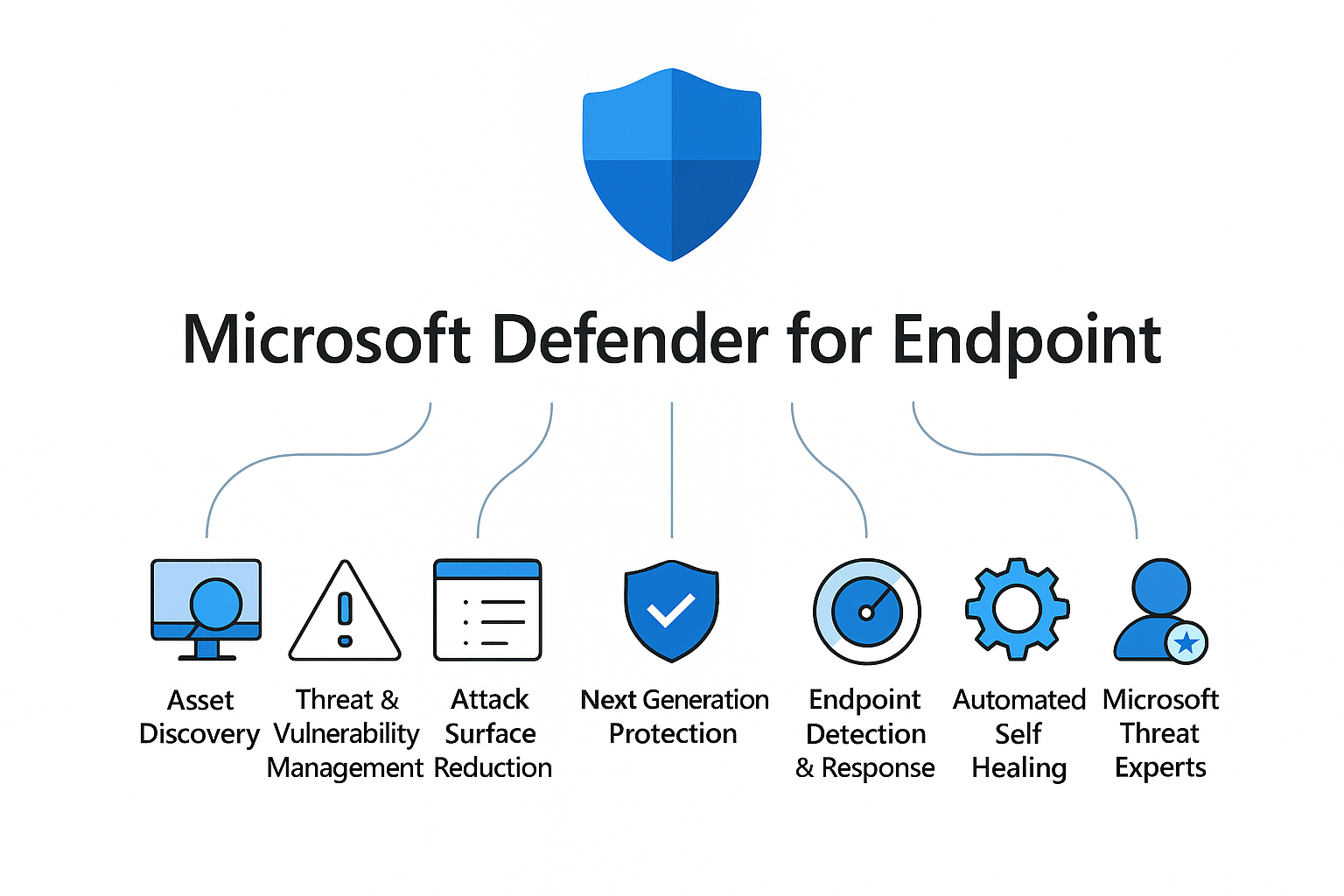
Microsoft Defender for Endpoint
Microsoft Defender for Endpoint is a collection of integrated capabilities designed to protect the entire endpoint lifecycle. Let’s break down the core components that make MDE a comprehensive endpoint security solution.
Asset Discovery
MDE continuously identifies devices in your network. This helps security teams understand their real attack surface, prioritize onboarding and discover shadow IT.
Detects unmanaged endpoints
Identification of Shadow IT
Threat & Vulnerability Management
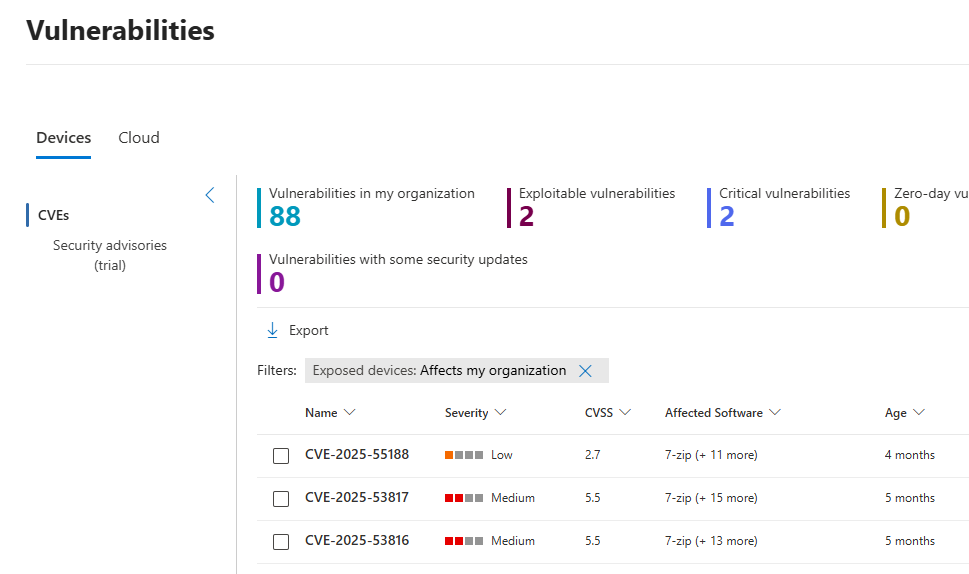
Threat & Vulnerability Managment
TVM provides real-time insights into software vulnerabilities. It’s not just a scanner, it prioritizes remediation based on exploitability and business context.
Vulnerability assessment
Recommendations with remediation steps
Software Inventories
Next-generation Protection
This is the evolution of a traditional antivirus. MDE uses cloud-delivered intelligence, machine learning, and behavior-based detection to block known and unknown threats.
Behaviour-based, Signature-based and heuristic detection
Cloud-based protection for new and emerging threats
Predictive technologies, machine-learning and ai to block malware at first sight
Attack Surface Reduction
ASR rules harden endpoints by reducing exploitable entry points. Think of it as proactive defense against common attack techniques.
E.g Block Office macros, Prevent credential theft…
A lot of so called low-hanging fruits for endpoint security
Audit-mode to reduce false positives
Endpoint Detection & Response
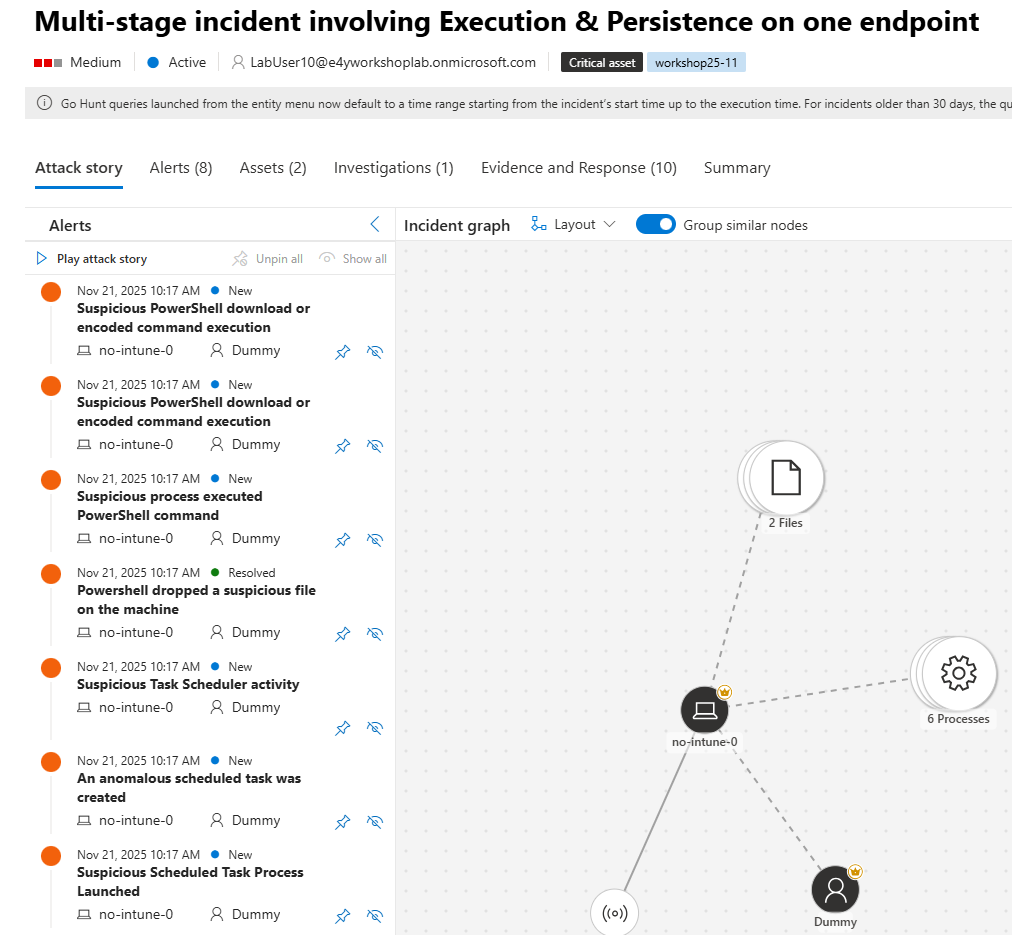
Endpoint Detection & Response
EDR is where detection meets investigation. It provides rich telemetry, advanced hunting, and incident response capabilities.
Alerting and investigation capabilities
Response measures
Advanced hunting with KQL queries
Automated Self-Healing
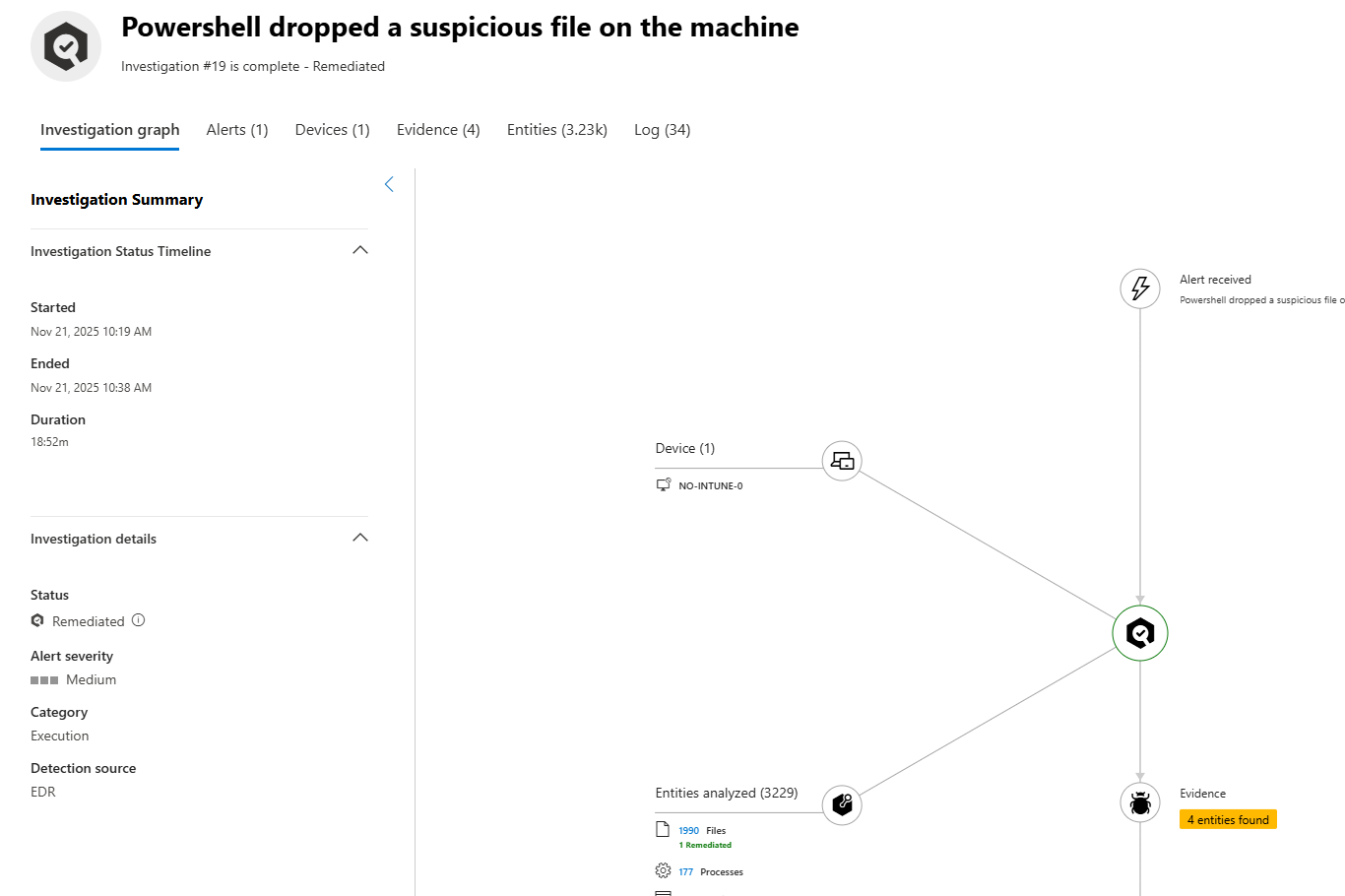
When an attack is detected, MDE triggers an investigation to automatically remediate affected files, registry keys, and services etc. Reducing response times.
Automated Investigation & Response
When an attack is detected, MDE triggers an investigation to automatically remediate affected files, registry keys, and services etc. Reducing response times.
Automated investigations
Classifies malicious or suspicious threats
Remediats threats without manual intervention
Microsoft Threat Experts
For organizations that need additional expertise, Microsoft Threat Experts provides managed threat hunting and incident response assistance.
Threat hunting
Expert-led investigations
Available as an paid add-on service
How MDE works: Cloud vs. Client
Microsoft Defender for Endpoint uses a hybrid detection and protection model. This means initial detection and blocking occur locally on the client, while the cloud provides advanced analysis for unknown or emerging threats. The result: faster, more accurate protection against both known and zero-day attacks.
When the client encounters a suspicious or unknown file, it sends metadata or the full file to the cloud protection service. The cloud then applies advanced machine learning (ML), behavioral analysis, and reputation checks to make a real-time verdict.
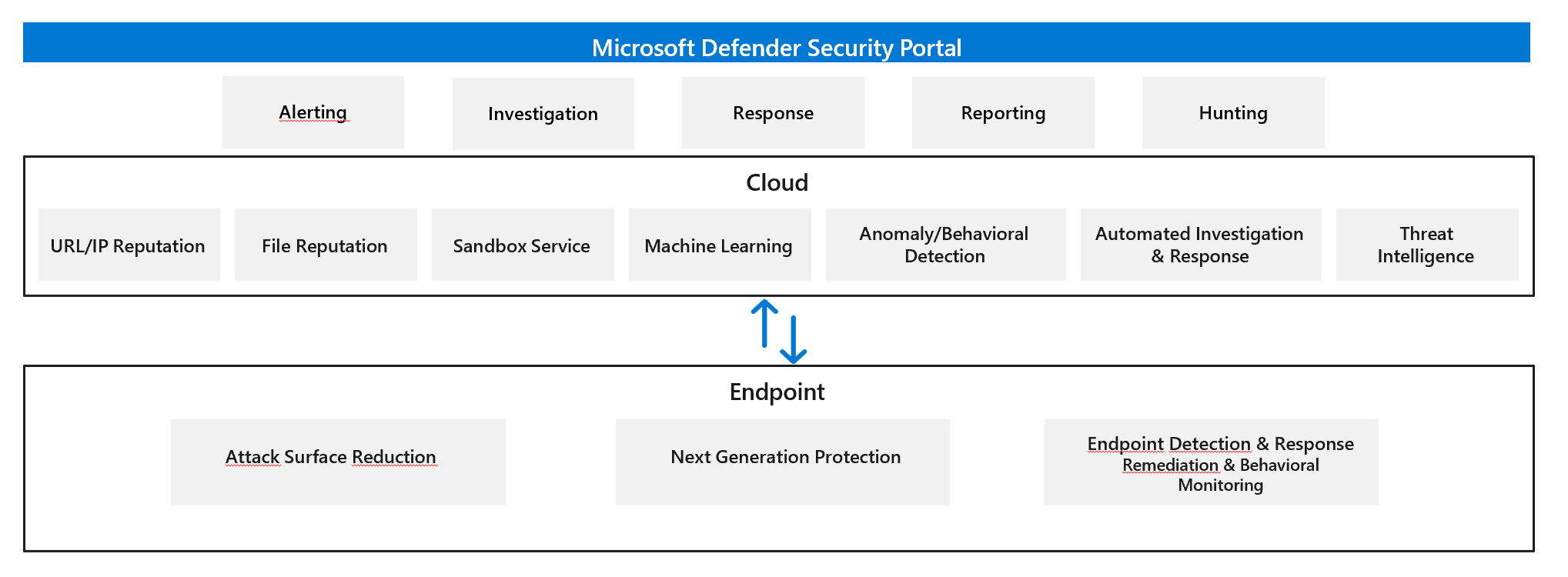
On the Client
Machine Learning (ML) Engine
Lightweight ML models make a verdict within milliseconds. Specialized models exist for file types commonly abused by attackers:Portable Executable (PE) files
PowerShell scripts
Office macros
JavaScript, PDFs, and more
Behavior Monitoring Engine
Observes runtime process behavior sequences to detect exploits, privilege escalation, persistence, and lateral movement.Memory Scanning Engine
Scans memory space of running processes to expose obfuscated malicious code.AMSI Integration Engine
Deep integration with scripting engines (PowerShell, VBScript, Office VBA) to detect fileless and in-memory attacks.Heuristics Engine
Identifies file characteristics similar to known malware to catch modified or new variants.Emulation Engine
Dynamically unpacks and emulates malware to expose polymorphic behavior and defeat packers.Network Engine
Inspects network activity for malicious patterns.CommandLine Scanning Engine
Scans process command lines pre-execution to block malicious commands.
In the Cloud
Metadata-based ML Engine
Analyzes featurized descriptions of suspicious files sent by the client using stacked ensemble classifiers.
Behavior-based ML Engine
Correlates suspicious sequences across millions of endpoints to detect advanced attack techniques.AMSI-paired ML Engine
Performs deep analysis of scripting behavior pre- and post-execution to catch fileless attacks.File Classification ML Engine
Uses multi-class deep neural networks to analyze full file contents. Suspicious files are held from execution until verdict.Detonation-based ML Engine
Executes suspicious files in a sandbox and applies deep learning classifiers to observed behaviors.Reputation ML Engine
Queries Microsoft’s global reputation sources (SmartScreen, Defender for Office 365) to block malicious URLs, domains, and attachments.Smart Rules Engine
Applies expert-written rules based on global threat intelligence.CommandLine ML Engine
Advanced ML models scan suspicious command lines in the cloud and send block signals back to the client.
What’s Next?
We’ve covered the fundamentals of Microsoft Defender for Endpoint, what it is, how it fits into the Defender XDR ecosystem, licensing details, and its core components. At this point, you should have a basic understanding of why MDE is.
But theory alone doesn’t stop attackers. The next step is a deep-dive into onboarding MDE.
In the next Article of the Zero to Hero series, we’ll dive into the technical details of getting MDE up and running in your environment.
Stay tuned, because the real journey from Zero to Hero starts when you onboard your first device.